Keller Williams Midtown Direct
  • HOME
  • LINKS
    • NEW AGENTS
  • GETTING STARTED
    • KWMTD Org Chart
    • To Do's First 60 Days
    • KW Terminology
    • Inside mykw.com
    • Inside eEdge Control Panel
    • New Agent Intro Class
    • Intro to Dotloop Class
    • Get Your Profile to 100%
  • HOW TO'S
    • Send Blast Email
    • Publish Office Post
    • Create 1 PDF in Dotloop
    • Sync Office Calendar
    • How To Create Greensheets
    • Setup kw.com Email on iPhone or Android
    • Intro to eEdge Marketing
    • Use Your Mobile App
    • Import Contacts in Bulk
  • FAQ's

Master Your Mobile App

The KW Mobile App is a great tool for your clients and leads to use, and have come to expect from Realtors who are up-to-date on the latest technology. It also provides you, the agent, with a lead-generating and customer insight tool. You'll want to publicize and market the KW Mobile App along with your Agent Code to get as many clients branding the app to you. This will give your leads and clients instant access to you when they are interested in a property.

The mobile app was designed by Smarter Agent, and the IDX feed for its listings are powered by WolfNet. WolfNet also powers your eAgentC website's property search. Because Keller Williams also uses Market Leader (which manages your eEdge website andcontact database), any leads generated by the app (a WolfNet product) are automatically shared with your eEdge myContacts database (a Market Leader product). This means that you won't need to manage two separate databases. All leads are funneled into Keller Williams' eEdge system.

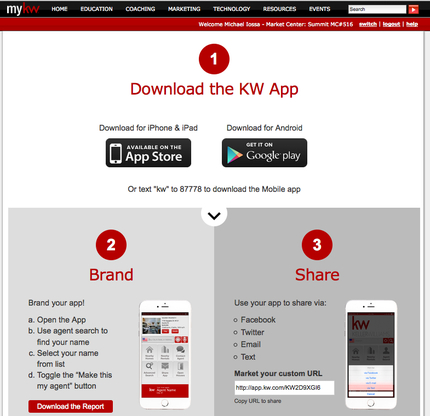
How to Download Brand and Share
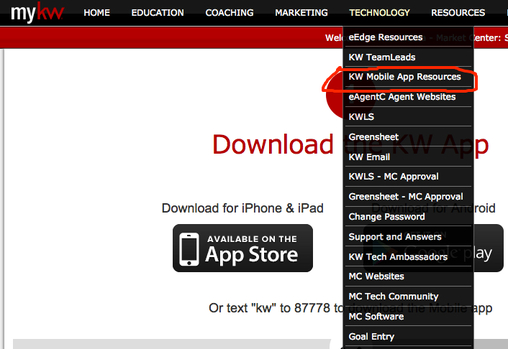
Access the Technology link your myKW page.
Picture
Picture

Make sure your profile is up to 100% with your updated contact information

Teams:
If you want the app to show something other than your first and last name, complete AWebs section 1.2. For example, to market a team name put the team name in “Agent Display Name”. http://admin.kw.com/websiteTemplateAdmin/admin/contactInfoGetAction.do

mykw.kw.com -> click + next to myMarketing-> click manage eAgentC website
-> complete section 1.2
-> complete section 4.5 (QR code available here)


Your browser does not support viewing this document. Click here to download the document.

Additional Training Resources click HERE

10 Ways to Share Your Mobile App click HERE


Mobile App Frequently Asked Questions

Your browser does not support viewing this document. Click here to download the document.

Master Your Mobile App Class Slideshow

Your browser does not support viewing this document. Click here to download the document.
Proudly powered by Weebly
  • HOME
  • LINKS
    • NEW AGENTS
  • GETTING STARTED
    • KWMTD Org Chart
    • To Do's First 60 Days
    • KW Terminology
    • Inside mykw.com
    • Inside eEdge Control Panel
    • New Agent Intro Class
    • Intro to Dotloop Class
    • Get Your Profile to 100%
  • HOW TO'S
    • Send Blast Email
    • Publish Office Post
    • Create 1 PDF in Dotloop
    • Sync Office Calendar
    • How To Create Greensheets
    • Setup kw.com Email on iPhone or Android
    • Intro to eEdge Marketing
    • Use Your Mobile App
    • Import Contacts in Bulk
  • FAQ's